


Ignite 2026 has landed, and Microsoft’s Copilot story has moved well beyond better prompts and faster content creation. The big shift? A connected system where your customers can ask, delegate, build and govern work from one place.
Some of these products were introduced before Ignite. What’s new is the momentum. Several are now generally available, others are moving into controlled Frontier previews, and Microsoft is putting a clearer commercial and governance model around advanced agentic work.
For your customers, that means more capable AI built into everyday workflows. For you, it opens up an opportunity far bigger than another licence sale. Here’s what was announced, and where we see the spark for your business.
One Copilot for several modes of work
The new Home experience is rolling out worldwide as the starting point in Microsoft Copilot. It brings Chat and Cowork together, so users can move between quick questions and complex delegated work without rebuilding their context. When a request needs more than an answer, Auto recommends moving it into Cowork. If the user agrees, the context goes with it.
Alongside Home, Office in Copilot is now generally available. Word, Excel and PowerPoint sit right beside the Copilot conversation, so users can create, edit and co-author real Microsoft 365 files, then move straight into the full Office apps. Files save to OneDrive and keep their Microsoft 365 permissions, sensitivity labels and compliance controls.
It’s worth being clear: these are availability milestones rather than brand-new concepts. Microsoft first introduced Home, Office in Copilot, Code and Autopilot on 25 September 2026. Ignite is where parts of that vision move from Frontier access into wider production availability.
So why does this matter? Copilot is becoming less of a feature inside individual apps and more of a consistent place to work across them. Users start with the outcome they want, not with a choice of which app or AI model to open.
Cowork becomes the delegation layer
Copilot Cowork is built for work you hand off, not questions you ask. It plans and completes multistep tasks, drawing on Microsoft 365 context, models, tools and agents to return a finished result.
Microsoft added several significant Cowork improvements at Ignite:
- Auto can adjust reasoning effort for each part of a task and, in Frontier, split complex work across subagents running in parallel.
- Proactive recommendations, powered by Work IQ, can suggest work worth delegating based on signals from email, meetings and Teams.
- Brand Kit in Cowork is rolling out, allowing an organisation’s colours, fonts and brand voice to be applied during content creation.
- App building in Cowork is generally available, turning a useful output into a reusable internal application.
- Planner and Viva Engage plugins are generally available, while additional role-specific skills extend Cowork across sales, finance, legal and other business functions.
For us, this is one of the most commercially relevant announcements at Ignite. Access to Cowork is only the starting point. Real value comes when customers identify the right workflows, decide what stays human-led and measure whether delegation is delivering better outcomes.
That’s where you come in. It opens natural conversations with your customers around process discovery, adoption, role-based use cases and ongoing optimisation.
Natural-language app building enters the workplace
With Copilot Code, users describe a dashboard, tracker, internal tool or application in natural language. Cloud projects run in a secure sandbox, and supported apps can be published through Copilot Managed Runtime, so IT can see and manage them in the Microsoft 365 admin centre.
Code is available now through the Frontier programme on Windows, web, iOS and Android, with general availability planned for December 2026. Its local Windows sandbox limits file and network access, and macOS local sandbox support is coming soon.
The platform underneath is moving forward too. Copilot Managed Runtime is now generally available, giving you a Microsoft-managed environment to host, run and govern apps built with Cowork, Code, Copilot Studio or compatible third-party tools. Optional Fabric integration adds database, storage and data API services.
So where’s your opportunity? Turning experimentation into something production-ready. That means validating requirements, securing data connections, testing outputs, managing the lifecycle and making sure ten departments share one application rather than building ten versions of the same thing.
Autopilot, Today and Workspaces make Copilot persistent
Until now, most Copilot experiences started when someone typed a prompt. Microsoft’s next wave keeps the work moving long after that first interaction.
Autopilot
Autopilot is a long-running personal productivity agent with its own identity, memory and access to approved tools. It follows threads, runs recurring work and keeps projects moving without a new prompt at every stage. Every action is tied to its own agent identity, and administrators can manage it.
Autopilot is rolling out through the Frontier programme. Microsoft’s current administration documentation lists it as a preview that requires a Microsoft 365 Copilot licence, Frontier eligibility, activation by an administrator and a Copilot Credit spending policy. Initial eligibility is regionally limited, so check current availability before you plan a rollout with your customers.
Today
Today builds a personalised view of priorities from email, calendars, chats and meetings, then prepares actions, such as draft messages or scheduling changes, for the user to review. Today Brief is included with a Microsoft 365 Copilot licence, while Today Feed’s recurring updates throughout the day use Copilot Credits. The experience is entering private preview through Frontier.
Copilot Workspaces
Copilot Workspaces, the evolution of Copilot Notebooks, gives teams a shared space for documents, context, people and agents. Copilot highlights what’s changed, what’s still open and which actions need attention. Workspaces is available in Frontier, and support for bringing personal Autopilot agents into a workspace is planned for later.
Work IQ supplies the context
Models are becoming widely available. So what sets one agent apart from another? Whether it understands the organisation, the work already done and the permissions around it.
Work IQ is Microsoft’s intelligence layer for work. It grounds Copilot and agents in emails, meetings, chats, files, relationships, business data and tools, all while respecting Microsoft 365 access controls.
Ignite expands Work IQ in three areas:
- Richer context and memory, helping agents carry useful information across sessions and experiences.
- More ways to act, including longer-running tasks and more complex workflows.
- New controls, separating read and action permissions and allowing policies to permit, block or require human approval for individual actions.
A new Listen capability, now in preview, lets agents respond when a relevant message or business event happens, rather than waiting to be prompted. Work IQ is also generally available in Microsoft Foundry and Copilot Studio, with access through MCP, REST and agent-to-agent protocols.
At platform level, Microsoft IQ is now generally available as the context-management layer spanning Work IQ, Fabric IQ, Foundry IQ and Web IQ. Microsoft says it builds on products customers already use, with no separate Microsoft IQ SKU or subscription. https://news.microsoft.com/events/ignite/2026/book-of-news/
The message is clear: AI readiness is data readiness. A better model will expose poor permissions, obsolete content and inconsistent business definitions, not hide them. Helping customers get this right is one of the most valuable conversations you can have right now.
Plugins bring business processes into Copilot
Microsoft is also growing the catalogue of business capabilities your customers can call on from Copilot and Cowork.
The Dynamics 365 Sales plugin and Dynamics 365 ERP apps plugin are now generally available. They bring sales, finance and operational context into Copilot, covering account planning, meeting preparation, pipeline analysis and source-to-pay activities.
Salesforce in Copilot is in preview with more than 38 prebuilt sales skills. It retrieves customer information and performs supported actions using the user’s existing Salesforce permissions, while Work IQ adds relevant context from Microsoft 365.
This is about more than connecting another system. It’s about packaging an organisation’s expertise into skills and plugins that people and agents apply consistently. You can help customers decide which data is authoritative, which actions to expose and where approval boundaries belong.
Agent 365 becomes the control and value layer
As agents multiply, every organisation needs clear answers to some simple questions. What agents exist? Who owns them? What can they access? What do they cost? Are they delivering value?
Microsoft Agent 365 is the central control plane for Microsoft and third-party agents. At Ignite, Microsoft expanded it across four areas:
- Management: Connected platforms and a consolidated registry across Microsoft and non-Microsoft agents.
- Governance: Central controls for plugins, skills and MCP tools, plus new views of inactive or ownerless agents.
- Security: Dynamic Agent Risk, local-agent discovery and controls spanning Entra, Defender, Purview, Intune and Windows.
- Business value: Cost Management and Business Analytics connecting AI spend, adoption and outcomes.
For partners and multi-tenant enterprises, multi-tenant agent management is now in public preview. It gives you a central view across managed tenants and supports consistent deployment, access decisions and governance. That’s a strong foundation for repeatable managed agent services.
Agent 365 Business Analytics is rolling out through Frontier. It brings AI spend, usage and measures such as task success, satisfaction and assisted hours together in one experience. Agent 365 Cost Management supports spending policies, limits, alerts and analysis across users, services, agents and models.
Licensing deserves a careful conversation, and we’re here to help you navigate it. Core inventory and basic governance come with qualifying Microsoft 365 plans. Advanced policy, telemetry, tool governance, and Entra, Purview, Defender and Intune capabilities require Microsoft 365 E7/G7 or the standalone Agent 365 subscription.
What this means for you
We see the opportunity from Ignite falling into six repeatable service conversations you can start having with your customers today:
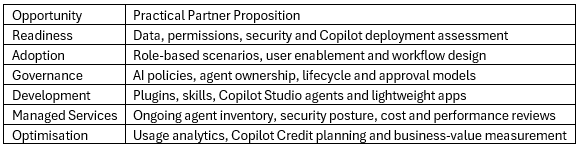
Your customers are already heading in this direction. The opportunity is bigger than another licence: get the data house in order, find the workflows that matter, deploy Copilot and agents responsibly, then manage the environment as it evolves.
Partners who join those capabilities together will build lasting advisory and managed-service relationships, not just one-off transactions. And you’re not doing it alone. We’ll be by your side at every step.
Ready to spark your Copilot growth?
Ignite 2026 has opened up new ways to grow your Microsoft practice. Whether you’re starting your first Copilot conversations or building managed agent services, the Infinigate Cloud Microsoft team is here to help you turn these announcements into real opportunities.
Want to find out more? Get in touch with the Microsoft Team at Infinigate Cloud: microsoft@infinigate.cloud