


Azure Virtual Desktop (AVD) is a flexible cloud-based virtual desktop infrastructure (VDI) platform that securely streams Windows 10/11 desktops and remote apps to users’ local devices from Azure. AVD can be quickly deployed, fully optimised and configured with maximum control, to provide a secure remote working environment for you and your customers, offering them the same Windows experience as they would have on a local desktop or laptop.
Benefits of AVD
Azure Virtual Desktop is packed with features and capabilities that will allow your customers to take advantage of the power of cloud-based virtualisation. Some benefits include:
Remote Working – AVD offers greater flexibility and mobility for your employees to connect from any location:
- Users can log in to their cloud-based desktop from anywhere in the world with an internet connection
- With the prevalence of bring-your-own-device (BYOD) in modern working, AVD is useful as users can use any device, including personal devices
- Users get a consistent Windows desktop which is the same, regardless of the operating system of their device
- Users have access to their Windows apps, including Office and Teams, as well as their own data
- Users can switch device and pick up from where they left off on another device
Security – AVD is a managed virtual desktop service that includes many security capabilities for keeping organisations safe:
- AVD uses reverse connect transport for establishing the remote session and for carrying RDP traffic, meaning there are no open inbound ports required
- Entra ID authentication including Multi-Factor Authentication (MFA), Conditional Access and Role-Based Access Control (RBAC) is required for all users and admins in AVD
- Confidential Virtual Machines (VMs) deny the hypervisor access to host the VM’s memory and state, keeping data secure while being processed in addition to while in transit and in storage
- Trusted Launch verifies the host VM’s bootloader, OS kernels and drivers to assure they haven’t been modified by a bad actor or malware
- Built-in AVD security features such as screen capture protection stop users from accidentally or maliciously taking screen prints of sensitive data. For highly sensitive environments, QR code watermarking can be enabled to allow security teams to track the source of data leaked when photos of the computer screen are taken.
Adaptability of AVD:
- AVD infrastructure runs on Azure which is available worldwide and is highly resilient, letting customer deploy environments close to whichever country their users are located
- AVD can be easily scaled to meet changing demand – provision and deprovision virtual desktops quickly and easily, ensuring the resources that are needed can operate at peak efficiency
- Customers have a choice of Windows 10 or Windows 11 to align with their current migration roadmap
- Customers have a choice of allocated or pooled host VMs and a large choice of host VM sizes including GPU enabled
- RemoteApp streams only the app and not the entire desktop
Cost Optimisation – AVD provides multiple cost optimisation benefits:
- Windows 10/11 multi-session allows several users to share a single host VM to realise maximum usage efficiency of the VM’s compute capabilities
- Scaling plans can turn host VMs on and off to meet fluctuating demand throughout the day or week, enabling customers to only pay for what they use
- Start host on demand allows all hosts to be turned off, whilst keeping the service available to use at any time
- Reserved Instances and Savings Plan for Compute can reduce costs when access is needed 24/7 and scaling isn’t the most cost efficient optio
- Existing Microsoft 365 user subscriptions may already have AVD included, reducing the need to purchase new licenses
Management – Using virtual desktops simplifies the provisioning and management of desktops for users, leading to improved operations management outcomes:
- Microsoft operates the AVD service so there is less to manage when compared to traditional VDI
- Deployment can be automated using Azure Resource Manager (ARM) templates
- Customisation of golden images speeds up deployment of new hosts
- Maintain control over configuration and management using Intune policies
- Monitor performance using Azure Monitor and the AVD Insights dashboard
Licensing AVD
Users with one of the following subscriptions can use Azure Virtual Desktop to access Windows 10 or Windows 11 desktops:
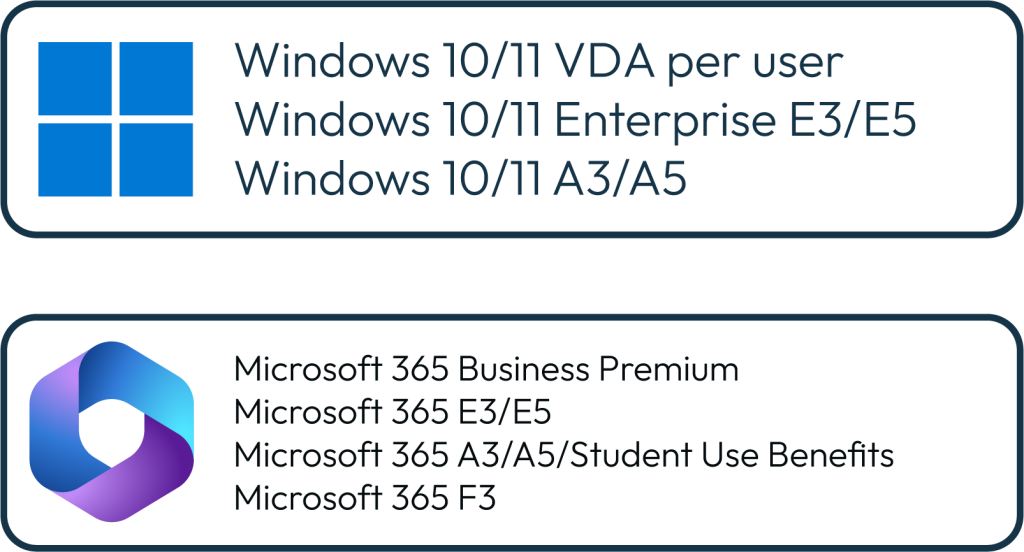
Most Windows 10/11 options have limitations on who can be assigned one of these licences – such as they must be the primary user of a device running Windows Pro or better and the device must be their primary device, meaning that primary device can’t be an Apple Mac, thin client, etc., or be running Windows Home edition. Microsoft 365 has no such restrictions.
Upgrade your customers to Microsoft 365 Business Premium
Many users who don’t already have Microsoft 365 Business Premium have Microsoft 365 Business Standard, and a common approach is to upgrade them to Microsoft 365 Business Premium.
Business Premium includes all the features of Business Standard, including Exchange Online, SharePoint Online, OneDrive, Teams, and the installable versions of Office apps such as Word, Excel, PowerPoint and Outlook.
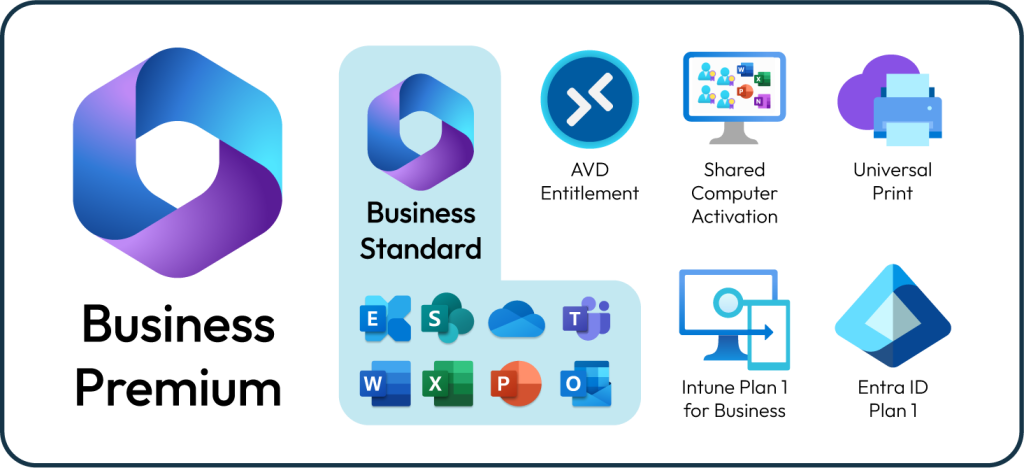
Business Premium adds entitlement to use of AVD along with some other features that are useful for AVD users, such as Universal Print to allow printing to network connected printers and Shared Computer Activation, so multiple users who are sharing the same AVD host can simultaneously activate their Office apps.
Intune Plan 1 for Business allows IT teams to use policies to manage and configure AVD host settings. Intune also allows applications to be installed and updated on AVD hosts. As well as keeping existing hosts running in a healthy state, both capabilities can help to automate deployment of new hosts.
Entra ID Plan 1, formerly known as Azure Active Directory Premium Plan 1, provides Conditional Access, allowing an organisation to set their own access policies. Stronger authentication can be requested, such as requiring MFA, depending on signals such as a user’s sign-in location, device compliance state and which app they’re using. AVD is a pre-defined app, so access policies can be targeted to AVD if required. Self-service password reset allows users to reset their own Entra ID password without involving an IT team.
How can we help?
As an Infinigate Cloud Partner, you will gain access to PRO, the pillar of support which packages up our technical expertise and provides our partners with the technical help they need, when they need it including technical pre-sales and professional services:
- Pre-Sales – the PRO team can support you and your teams to scope for apps and infrastructure opportunities.
- Professional Services – the team can support with deployment to free up your engineers and internal IT teams to fill a capability or capacity gap.
- Education – Infinigate Cloud provide training courses through EDGE such as AZ-900 | Configuring and Operating Microsoft Azure Virtual Desktop and workshops such as Reach for the Cloud | Microsoft Azure Virtual Desktop
For more information
Infinigate Cloud is an expert business unit within the Infinigate Group specialising in secure cloud solutions.
As a born in the cloud distributor with a deep technical heritage, we are digital natives who continually invest in our teams and evolve our value-add services to ensure we deliver the very best in technical expertise and support for our partners.
Our 25+ years of experience in the cloud, long-standing relationship with Microsoft and our breadth and depth of cyber security expertise, has taught us that we are only successful if our partners are, as evidenced by our world-class partner satisfaction. Award winning education and go to market services help our partners achieve their full potential and grow their businesses faster.
If you are interested in learning more, please get in touch today.